


What’s new
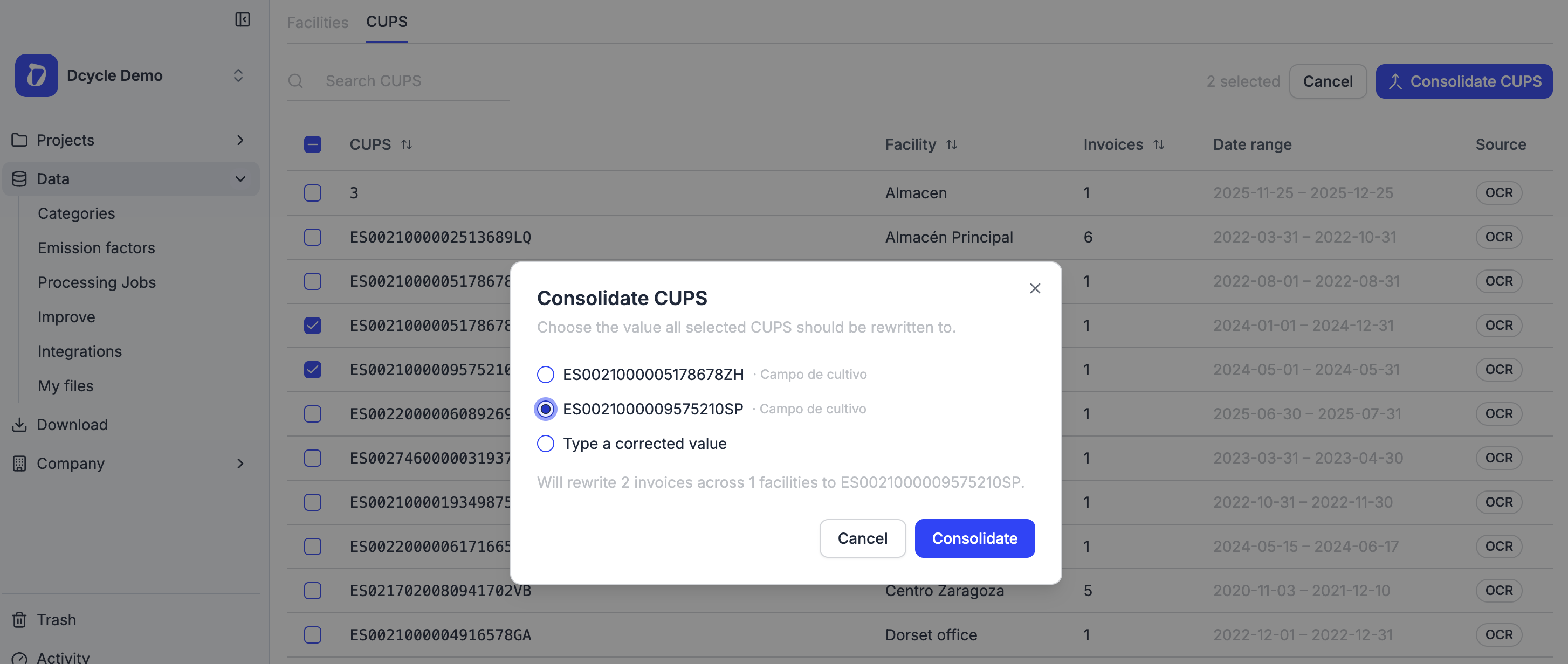
When you upload electricity invoices, Dcycle automatically reads the CUPS, the code that identifies each supply point. Sometimes that automatic reading does not capture the code identically on every invoice (for example, it drops the final letters), so a single supply point ends up showing as several different CUPS. We have added a dedicated section to fix this in a few clicks.
- See every CUPS in your organization in one place, with its facility, invoice count and date range.
- Filter by facility or search for a specific CUPS.
- Select several CUPS that are really the same supply point and merge them into one value.
How it works
You will find the new section under Data, inside Facilities, in the CUPS tab. Select the duplicate CUPS, click Consolidate CUPS, and either pick the correct value from your selection or type the corrected one. Before you confirm, you will see an impact summary showing how many invoices and facilities will be updated. Once confirmed, every affected invoice is updated to the same CUPS automatically. CUPS synced from Datadis are shown but protected, since their value is official and should not be changed.
Why it matters
Keeping a single CUPS per supply point improves the quality of your data and the accuracy of your energy and carbon footprint reports. It also saves time: instead of editing invoices one by one, you correct dozens of them in a single action. And because future uploads match your facilities more reliably, you will spend less time on manual cleanup going forward. It is a small change that keeps your electricity data clean and report-ready.